Full-stack Advanced [OGI06j]
09. Test & Deploy
09.1
Introduction
Laravel Subjects we didn't talk about
-
Let's have a tiny introduction to …
-
Logging
Hint: check 1 of the Laravel log readers, or try Laravel Telescope - Writing commands for Artisan Console
- Mail and Mailables
- Task Scheduling (how to run the scheduler)
- Localization and Laravel Lang
-
Logging
- And there's much more: Cache Events Socialite …
What we'll cover
- Three topics in this lecture:
- Testing — making sure your code behaves as expected
- Linting & Code Analysis — keeping the codebase clean and safe
- (Manual) Deployment — getting your app to production
- Each of these can be wired up as a stage in a CI/CD pipeline — we'll see that in 09.6
09.2
Testing
Testing overview
- Testing capabilities in Laravel
- Unit tests
- HTTP tests (= scenario or feature tests)
- Console Tests (= scenario or feature tests)
- Browser Tests with Laravel Dusk
- Creating test database records with model factories and seeders
What to test?
-
What to test in a Web API or Web application?
- This is opinionated
-
At least
- Unit test your own classes (e.g.
ShoppingCart,Address); testing Eloquent models is unnecessary - HTTP test the expected (e.g. can a user register for this website?)
- HTTP test the unexpected (e.g. what happens if a user registers with wrong input?)
- Unit test your own classes (e.g.
3 main Types of Tests in Laravel
- Unit tests
- Test a method or a class
-
Directory:
tests/Unit - Your Laravel app is not booted (!) so you cannot access the database or other services
-
Recommended: only when you need to test some logic you created yourself e.g. class
Cart, a helper method, …
- Feature tests
- Test larger portions of your code, even the response to a full HTTP request (or the result after some interaction with you own console command)
-
Directory:
tests/Feature - Your Laravel app is booted
- Most of your Laravel tests should be feature tests ~ your system as a whole is functioning
- Browser tests
- Laravel Dusk: test your application by (a) browser instance(s)
Pest or PHPUnit?
- Laravel supports testing with Pest and PHPUnit
- However your project can only have installed Pest or PHPUnit
- Since Laravel 11, Pest is the official default
-
The Laravel installer
lets you choose, but
composer create-project* installs PHPUnit 🤔 - ⟶ we'll continue with PHPUnit
- Pest is built on top of PHPUnit
- Currently in Laravel 11, if you want to switch from PHPUnit to Pest, follow these instructions
Configuration
- Goal: tests run in an isolated environment — no impact on your dev database, sessions, mail, …
/phpunit.xmlcontains your testing environment variables- e.g. session and cache drivers are set to
array - e.g.
DB_CONNECTIONcan be set tosqlite
- e.g. session and cache drivers are set to
- optionally you can create
.env.testing-
.env.testingoverrules.envwhen testing (or when adding--env=testingto artisan commands)
-
tests/TestCase.phpis the parent class of all test classes. Leave it there!
Creating and running (1)
- Creating a unit test
php artisan make:test ExampleTest --unit - Creating a feature test
php artisan make:test UserTest - In this test you may code any tests as you would in PHPUnit
<?php
namespace Tests\Unit;
use PHPUnit\Framework\TestCase;

class ExampleTest extends TestCase
{
    /**
     * A basic test example.
     *
     * @return void
     */
    public function test_basic_test(): void
    {
        $this->assertTrue(true);
    }
}
Creating and running (2)
- Running all tests
php artisan test - Any option passed to the
phpunitcommand, may passed here as wellphp artisan test --testsuite=Feature --filter=UserTest --stop-on-failure - Speed up the process by running tests in parallel
AAA: Arrange, Act, Assert
- A widely-used structure for individual tests
- Arrange — set up the world: create users, seed data, fake services
- Act — perform the action under test (e.g. an HTTP request)
- Assert — verify status code, response body, database state, …
- Forces you to test one thing at a time and keeps tests readable
public function test_homepage_lists_recent_tasks(): void
{
    // Arrange
    $this->seed();

    // Act
    $response = $this->get('/');

    // Assert
    $response->assertOk();
    $response->assertSee('Recent tasks');
}
Database testing: RefreshDatabase
- Tests that touch the database should be independent: one test should never see leftovers from another
- The
RefreshDatabasetrait does this for you:- Runs migrations once per testsuite
- Wraps each test in a transaction and rolls it back at the end
- Combined with an in-memory SQLite database → near-instant resets
use Illuminate\Foundation\Testing\RefreshDatabase;

class TaskTest extends TestCase
{
    use RefreshDatabase;

    public function test_index_lists_recent_tasks(): void
    {
        // ...
    }
}
Test data: seed or factories?
- You need data to test against. Two options:
- Run your seeders from inside a test
Useful when you have a meaningful "starter dataset"$this->seed(); // run all seeders $this->seed(TaskSeeder::class); // or one specific seeder - Use factories to create exactly the data this test needs
$user  = User::factory()->create();
$tasks = Task::factory()->count(10)->create();
- Run your seeders from inside a test
- Rule of thumb: prefer factories — tests become more explicit and less fragile when seeders evolve
Factories (1): creating
- Generate a factory file:
php artisan make:factory TaskFactory --model=Task - Discovery convention:
Database\Factories\<Model>Factoryis auto-linked toApp\Models\<Model>. - Add the
HasFactorytrait on the model !!! - Define the default attributes:
class TaskFactory extends Factory
{
    public function definition(): array
    {
        return [
            'description' => fake()->sentence(),
            'priority'    => fake()->randomElement(['low', 'medium', 'high']),
            'completed'   => false,
            'user_id'     => User::factory(),
        ];
    }
}
Factories (2): using
- Create one, many, or with overrides:
$task = Task::factory()->create(); $tasks = Task::factory()->count(5)->create(); $mine = Task::factory()->create(['description' => 'Buy milk']); - Related models? Use the factory of the related model (see
TaskFactoryabove):'user_id' => User::factory(), - States — named variations of the default:
public function highPriority(): static
{
    return $this->state(fn (array $attrs) => ['priority' => 'high']);
}

// usage
Task::factory()->count(3)->highPriority()->create();
HTTP Tests
- Fluent API internally invokes simulated
get,post,put,patchordeleteHTTP request, returning aIlluminate\Testing\TestResponseobjectuse Tests\TestCase; class ExampleTest extends TestCase { public function test_a_basic_request(): void { $response = $this->get('/'); $response->assertStatus(200); } } - Customizing request headers e.g.
$this->withHeaders([
    'X-Header' => 'Value',
])->post('/user', ['name' => 'Sally']);
$user = User::factory()->create(); // see database/factories/UserFactory.php $response = $this->actingAs($user) ->withSession(['banned' => false]) ->get('/'); -
Debugging responses with
$response->dumpHeaders(),$response->dumpSession()and$response->dump()
Common response assertions
- Status & redirects
$response->assertOk(); // 200 $response->assertCreated(); // 201 $response->assertUnauthorized(); // 401 $response->assertNotFound(); // 404 $response->assertStatus(422); $response->assertRedirect(route('login')); - Rendered HTML
$response->assertSee('Create new task'); $response->assertSeeText('Welcome'); - Form validation
$response->assertSessionHasErrors('title');           // SSR
$response->assertJsonValidationErrors(['title']);     // JSON API
Testing JSON APIs
- Issue JSON requests with
getJson,postJson, …$response = $this->postJson('/api/user', ['name' => 'Sally']); $response ->assertStatus(201) ->assertJson([ 'created' => true, ]); // in array format: // $this->assertTrue($response['created']); - More goodies
->assertExactJson(['created' => true,])->assertJsonPath('team.owner.name', 'Darian')
Read more on Fluent JSON Testing->assertJson(fn (AssertableJson $json) => $json->where('id', 1) ->where('name', 'Victoria Faith') ->missing('password') ->etc() );
Database assertions
- Verify the effect of your test on the database, not only the response:
$this->assertDatabaseHas('tasks', [ 'description' => 'Buy milk', 'user_id' => $user->id, ]); $this->assertDatabaseMissing('tasks', ['description' => 'Old task']); $this->assertDatabaseCount('tasks', 0); - More: Available database assertions
More on HTTP Tests
- Testing File Uploads
use Illuminate\Http\UploadedFile;
use Illuminate\Support\Facades\Storage;

Storage::fake('public');
$file = UploadedFile::fake()->image('avatar.jpg', 400, 400);

$response = $this->post('/profile', ['avatar' => $file]);
// And assert it was stored on the fake disk Storage::disk('public')->assertExists($file->hashName()); - Testing Views
-
List of all available assertions on a
TestResponseobject
09.3
Linting & Code Analysis
Overview
-
Goals
- improve code quality
- catch potential bugs
- improve performance
- improve security
- Tools
- Laravel Pint (style)
- Larastan (code analysis)
- Enlightn (performance & security)
- Integrate them as Git hooks
- Manual example: Pint pre-commit hook
- Auto-install by igorsgm/laravel-git-hooks
- Integrate them in your CI/CD pipeline, together with your tests
09.4
(Manual) Deployment
Demo: deployment on Plesk (1)
- Some technical details on ikdoeict-plesk
-
You login to Plesk on
https://firstnamelastname.ikdoeict.be:8443/using your Odisee-credentials - You can use the SSH Terminal (in order to run commands) from the Plesk web interface
-
You login to Plesk on
Demo: deployment on Plesk (2)
- Login to SSH Terminal and
git clone https://gitlab.com/ikdoeict/joris.maervoet/laravel-tasks-api.git -
In Plesk, add a subdomain
tasks.jorismaervoet.ikdoeict.be
and point the Document Root of the subdomain to the public folder of the Laravel project:<home>/laravel-tasks-api/app/public -
From Plesk's subdomain panel
- Click on SSL/TLS certificate and add valid SSL/TLS certificate from Let's Encrypt
- Click on PHP-settings and choose the most recent PHP version (display_errors should be "Off" - you're in production)
- Click on Databases and create an empty database and copy db name, user name and password to notepad
- Click on PHP Composer and try to install the Laravel-packages (or just run
composer install --no-dev)- Problems? remove
composer.lockandvendorin the File Manager and retry
- Problems? remove
Demo: deployment on Plesk (3)
- From SSH Terminal
cd laravel-tasks-api/app/ cp .env.example .env php artisan key:generate -
Manually edit
.env
In case it's a web API used from an SPA from other subdomain with auth:APP_ENV=production APP_DEBUG=false APP_URL=https://tasks.jorismaervoet.ikdoeict.be DB_HOST=localhost DB_DATABASE=(copy from your notepad) DB_USERNAME=(copy from your notepad) DB_PASSWORD=(copy from your notepad)SANCTUM_STATEFUL_DOMAINS=ikdoeict.be,frontend.bartdelrue.ikdoeict.be SESSION_DOMAIN=.ikdoeict.be - Further run in SSH Terminal
⚠ Warning: only runphp artisan storage:link php artisan migrate --force php artisan db:seed --forcedb:seedon production if your seeders are idempotent and safe (no fake/random data, no destructive truncates). Otherwise skip it.
Further optimization
- Read the docs on Optimization carefully and further optimize production with
php artisan config:cache php artisan event:cache php artisan route:cache php artisan view:cache - All at once:
php artisan optimize - Disable caching:
php artisan optimize:clear - Your webapp is even faster but enabling these caches might have side-effects! Caution!
Maintenance mode
- Did you know you can put the whole application in maintenance mode?
php artisan down - Guess how to disable maintenance mode ;-)
Updating
- Boils down to running a set of commands, for example (just an example !)
php artisan down git pull composer install --no-dev php artisan migrate --force php artisan optimize php artisan up - Zero downtime: actually, it's better to clone any new version into a new directory, and to switch a symlink to the new version
09.5
Laravel Envoy
Laravel Envoy
- a tool executing commands (over SSH) on remote servers
- uses the Blade syntax to define tasks for deployment
How does it work?
- Install Envoy into your project
composer require laravel/envoy --dev - Define your tasks in
/Envoy.blade.php:@servers(['web' => ['user@192.168.1.1'], 'workers' => ['user@192.168.1.2']]) @task('deploy', ['on' => 'web']) cd /home/user/example.com git pull origin {{ $branch }} php artisan migrate --force @endtask -
Run a task by
php vendor/bin/envoy run deploy --branch=master - Want more? Envoy Docs
- Envoy is especially popular for small to mid-size projects or teams that want to keep things simple without setting up a full CI/CD pipeline: Example
- Envoy can be used inside a CI/CD pipeline
Sidenote
- Want to use Envoy in order to deploy to Plesk from your local machine?
-
Set up SSH connection:
- Generate a key pair e.g.
ssh-keygen -t rsa -b 2048(or reuse the key pair in~/.ssh) - Register the public key in Plesk (pull button > SSH Keys Manager)
-
Find IP address and username in Plesk (tab Hosting & DNS > Hosting > Hosting Settings)
Host name cloudplesk.ikdoeict.be will work as well - Use your.name@cloudplesk.ikdoeict.be in
/Envoy.blade.php. Envoy will use the SSH key from the underlying OS.
- Generate a key pair e.g.
-
Set up SSH connection:
09.6
CI/CD: an Introduction
CI/CD
- Continuous Integration: each time you push your code changes, automated builds and tests are run
- Continuous Delivery/Deployment: your application is also deployed continuously with/without human intervention
- (gitlab CI/CD supports these processes …)
CI/CD in gitlab
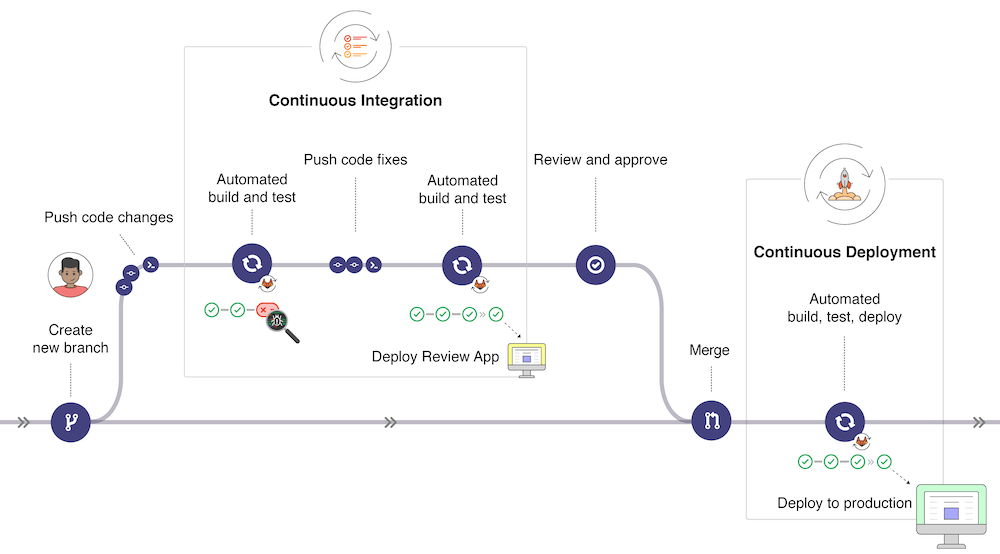
Let's have a look together
- Loris Leiva, Using GitLab's pipeline with Laravel → .gitlab-ci.yml
- Loris Leiva, Laravel deployment using GitLab's pipelines → .gitlab-ci.yml
- Ahmed Esa, Automated Laravel Deployment to cPanel via GitLab CI/CD and Envoy
Gitlab pipeline for ikdoeict/Plesk (1)
- Idea: change testing defaults to in-memory SQLite anywhere
-
Stages: use a
lorisleiva/laravel-docker:8.3container to build, lint, test and deploy -
Preparation
- Generate a key pair in a dummy directory on your system:
ssh-keygen -t rsa -b 2048 - Register the public key in your Plesk account:
Pull button > SSH Keys > SSH Keys Manager -
Enter the private key and your Plesk username in your Gitlab-account
Settings > CI/CD > Variables
variable type "File" with key "SSH_PRIVATE_KEY" (put newline at end of key)
variable type "Variable" with key "SSH_USERNAME"
- Generate a key pair in a dummy directory on your system:
Gitlab pipeline for ikdoeict/Plesk (2)
-
In
phpunit.xml, enable testing with in-memory SQLite:
        <env name="DB_CONNECTION" value="sqlite"/>
<env name="DB_DATABASE" value=":memory:"/>-
Write your tests with the trait
RefreshDatabase…
<?php

namespace Tests\Feature;

use App\Models\Task;
use App\Models\User;
use Illuminate\Foundation\Testing\RefreshDatabase;
use Tests\TestCase;

class TaskControllerTest extends TestCase
{
    use RefreshDatabase;

    protected User $standardUser;
    protected User $adminUser;

    protected function setUp(): void
    {
        parent::setUp();

        $this->standardUser = User::factory()->create(['role' => 'standard']);
        $this->adminUser = User::factory()->create(['role' => 'admin']);
    }

    public function test_a_standard_user_can_only_see_his_own_tasks()
    {
        $task = Task::factory()->create(['user_id' => $this->standardUser->id]);
        Task::factory()->create(); // Task for someone else

        $response = $this->actingAs($this->standardUser)->getJson('/api/tasks');

        $response->assertOk();
        $response->assertJsonCount(1, 'data');
        $response->assertJsonFragment(['id' => $task->id]);
    }

    public function test_an_admin_can_see_all_tasks()
    {
        Task::factory()->count(3)->create();

        $response = $this->actingAs($this->adminUser)->getJson('/api/tasks');

        $response->assertOk();
        $response->assertJsonCount(3, 'data');
    }
}- … and factories:
<?php
namespace Database\Factories;

use App\Models\User;
use Illuminate\Database\Eloquent\Factories\Factory;

class TaskFactory extends Factory
{
    public function definition(): array
    {
        return [
            'description' => fake()->sentence,
            'priority' => fake()->randomElement(['low', 'medium', 'high']),
            'user_id' => User::factory(),
            'created_at' => now(),
        ];
    }
}
Gitlab pipeline for ikdoeict/Plesk (3)
-
Your
.gitlab-ci.yml:
image: lorisleiva/laravel-docker:8.3

stages:
  - build
  - lint
  - test
  - deploy

default:
  before_script:
    - cd app

# Build Stage
composer:
  stage: build
  script:
    - composer install --no-interaction --no-ansi --no-progress
    - cp .env.example .env
    - php artisan key:generate
  artifacts:
    paths:
      - app/vendor/
      - app/.env
    expire_in: 1h

# Lint stage
pint:
  stage: lint
  needs:
    - job: composer
      artifacts: true
  script:
    - vendor/bin/pint --test

# Test Stage
unit_test:
  stage: test
  needs:
    - job: composer
      artifacts: true
  script:
    - php artisan test

# Deploy Stage
deploy:
  stage: deploy
  script:
    - 'which ssh-agent || ( apt-get update -y && apt-get install openssh-client -y )'
    - eval $(ssh-agent -s)
    - chmod 400 "$SSH_PRIVATE_KEY"
    - ssh-add "$SSH_PRIVATE_KEY"
    - mkdir -p ~/.ssh
    - chmod 700 ~/.ssh
    - echo -e "Host *\n\tStrictHostKeyChecking no\n" > ~/.ssh/config
    - ssh $SSH_USERNAME@cloudplesk.ikdoeict.be "export PATH=/opt/plesk/php/8.3/bin:\$PATH && cd /data/vhosts/jorismaervoet.ikdoeict.be/laravel-tasks-api-11 && git pull origin master && cd app && composer install --no-interaction --prefer-dist --optimize-autoloader && php artisan migrate --force && php artisan optimize"
  only:
    - master