Full-stack Advanced [OGI06j]
11. Hybrid Rendering
11.1
Introduction
Until now: 2 types of architectures
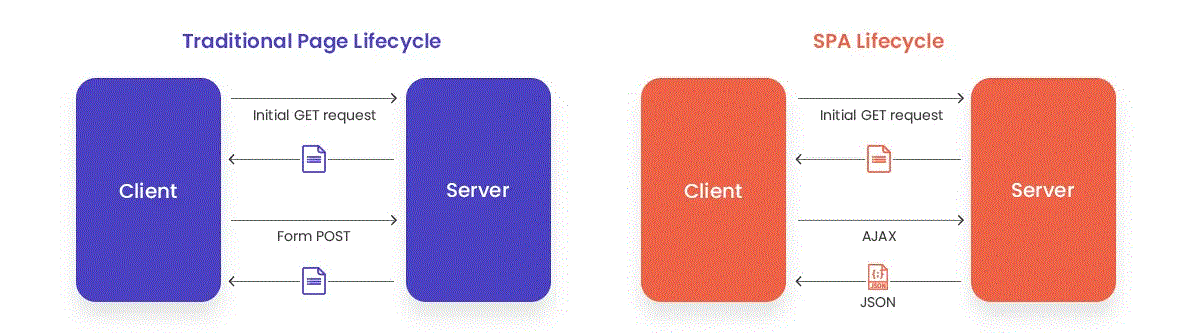
-
Left:
server-side rendered (SSR) applications (e.g. with Blade templates)
- Page reloads
- Server renders HTML, emits redirects, ...
- Eventually JavaScipt-flavoured
-
Right:
single page application (SPA) with Web API backend
- After initial HTML/CSS/JS load, the front end communicates with a REST (or GraphQL) API
-
Example: Laravel + Vue: multiple types of project setups:
- Two separate projects (Laravel API + Vue SPA)
- Integrated in one big Laravel project (monolith)
- Separate apps in one directory (monorepo)
Hybrid Rendering & Modern Monoliths
-
Why Hybrid Rendering?
- SPAs are powerful but complex (API, state, hydration...)
- Server rendering is simple but less dynamic and scalable
- Hybrid approaches give us the best of both worlds
- No need to separate frontend/backend completely
-
What is a Modern Monolith?
- Single codebase for backend and frontend
- No separate API required
- Interactivity with minimal (or less) JavaScript
- Examples: Inertia, Livewire, HTMX, Fusion
Before we start (1)
- Laravel's asset bundling uses Vite as front-end build tool
-
In Laravel's project root there are:
package.jsonandvite.config.js -
Typically you develop in
resources/ts/*,resources/js/*andresources/css/* -
You run
npm run devandnpm run build, building topublic/build -
From your Blade template(s), load your scripts by
@vite('resources/js/app.js') -
public/buildis in.gitignore, so you will need to build for/to production
Bugs & things to fix
It's advisory to use npm from our Docker env, but mind the following.
-
Verify if you really have node version 22, and if not force a rebuild of the php-web image.
$ docker compose exec -u 1000:1000 php-web bash node -v > v18.20.3 $ docker compose down $ docker compose build --no-cache php-web $ docker compose up -
Unfortunately, npm has some bug when not executed as root user. Fix:
$ docker compose exec php-web bash
mkdir /.npm
chown -R 1000:1000 "/.npm"
exit

$ docker compose exec -u 1000:1000 php-web bash
npm install
npm run build
11.2
HTMX
HTMX
- Created by: Carson Gross (2020)
- What: lightweight JavaScript library
- How: enhances HTML with dynamic behavior using custom attributes (hx-*)
- HTML-over-the-wire interaction with minimal JavaScript
- Backend: server-independent (works well with Laravel Blade)
- htmx is controversial: HTMX for your next project, 1,000s of opinions, htmx sucks #ironical, the future of htmx
HTMX example
HTML
<script src="/path/to/htmx.min.js" defer></script>
…
<!-- Button that triggers an HTML fragment replacement -->
<button hx-get="/counter" hx-target="#count" hx-swap="outerHTML">Increment</button>
<div id="count">0</div>
URL /counter - server response (to request containing HX-Request header)
<!-- Response is HTML that replaces the #count element -->
<div id="count">1</div>
11.3
Inertia.js
Inertia.js
- Created by: Jonathan Reinink (2019)
- What: JavaScript library + Laravel adapter
- How: Laravel returns JSON with props and component name
- Frontend: Vue/React/Svelte renders page
Inertia.js example (1)
Vue-component /resources/js/Pages/Post/index.vue
<template>
<div>
  <h1>My Inertia CRUD</h1>
  <Link href="posts/create">Create new Post</Link>
  <table>
    <thead>
      <tr>
        <th v-for="header in headers" :key="header">
          {{ header }}
        </th>
      </tr>
      </thead>
      <tbody>
        <tr v-for="post in posts" :key="post.id">
          <td>{{ post.title }}</td>
          <td>{{ post.body }}</td>
        </tr>
      </tbody>
    </table>
  </div>
</template>

<script setup>
import { Link } from "@inertiajs/vue3";

defineProps({
  posts: {
    type: Array,
    default: () => [],
  },
});

const headers = ["posts", "body"];
</script>
Inertia.js example (2)
Laravel controller /routes/web.php
use Inertia\Inertia;

Route::get('/posts', function () {
    $posts = Post::all();
    return Inertia::render('Post/Index', ['posts' => $posts]);
});
/posts returns full HTML unless it contains a X-Inertia: true header, than it returns JSON:
{
  "component": "Post/Index",
  "props": {
    "posts": [
      {
        "id": 1,
        "title": "First Post",
        "body": "This is the first post.",
        "created_at": "2025-06-01T12:00:00.000000Z",
        "updated_at": "2025-06-01T12:00:00.000000Z"
      },
      {
        "id": 2,
        "title": "Second Post",
        "body": "This is the second post.",
        "created_at": "2025-06-01T13:00:00.000000Z",
        "updated_at": "2025-06-01T13:00:00.000000Z"
      }
    ]
  },
  "url": "/posts",
  "version": null
}
Hands-on
- Let's read about the server-side and client-side setup
- Let's have a look at a fully functional tasklist project
11.4
Fusion
Fusion
- Created by: Aaron Francis (2023)
- Status: very early development preview
- What:
- you write in 1 file both PHP/Laravel and JavaScript/Vue
- Fusion runs your PHP block as part of a Laravel controller
- Fusion transpiles the JavaScript (prop injection)
- Technology: only works on Laravel + Inertia.js
Fusion example
<php>
  new class {
    public string $name;

    public function mount()
    {
      $this->name = Auth::user()->name;
    }
  }
</php>

<template>
  Hello {{ name }}!
</template>
11.5
Livewire
Livewire
livewire.laravel.com (url since v3)
- Created by: Caleb Porzio (2019)
- What: dynamic front-end applications entirely written in Laravel/PHP
-
How:
- Initial page load: server renders Blade component, but injects some JavaScript (Livewire JS bridge + Alpine.js)
- User interaction: Livewire JS bridge captures the event and sends request to the server (url
livewire/update) with component's state and action -
Request is processed on the server:
- Livewire reruns component class
- Livewire renders the Blade view again
- Livewire returns a JSON response with the new rendered HTML fragment and state
- On the client: Livewire JS bridge receives the response and replaces parts of the DOM
Livewire example (1)
-
Install:
composer require livewire/livewire -
⟶ Let's create a (default) layout:
php artisan livewire:layout -
⟶ creates
resources/views/layouts/app.blade.php<!DOCTYPE html> <html lang="{{ str_replace('_', '-', app()->getLocale()) }}"> <head> <meta charset="utf-8"> <meta name="viewport" content="width=device-width, initial-scale=1.0"> <title>{{ $title ?? config('app.name') }}</title> @livewireStyles </head> <body> {{ $slot }} @livewireScripts </body> </html> -
⟶
@livewireStylesand@livewireScriptsload the necessary CSS/JS assets for Livewire to work
Livewire example (2)
-
Create a page component:
php artisan make:livewire pages::counter -
⟶ generates a single-file (page) component
resources/pages/⚡counter.blade.php
⟶ let's update the component
<?php
use Livewire\Component;

new class extends Component {
    public int $count = 1;

    public function increment(): void {
        $this->count++;
    }

    public function decrement(): void {
        $this->count--;
    }
};
?>
<div>
    <h1>{{ $count }}</h1>

    <button wire:click="increment">+</button>
    <button wire:click="decrement">-</button>
</div>
Livewire example (3)
-
wire:clicklistens for a click event and calls a method on the Livewire component. Livewire then updates the component on the server and refreshes the DOM with any changes. -
One-way data flow for
$count : when the value changes in the component class, Livewire re-renders the view and updates the DOM with the new value. - Want to render this page component?
-
Page components can be rendered directly in
routes/web.phpif there is a default layoutRoute::livewire('/counter', 'pages::counter');
Livewire: server response
URL: /livewire/message/counter
{
  "components": [
    {
      "snapshot": "{...}", // component state ("count" : 2) + metadata + checksum
      "effects": {
        "returns": [null], // as returned by the method increment()
        "html": "<div wire:id=\"...\">...</div>" // the updated HTML to be patched into the DOM.
      }
    }
  ],
  "assets": [] // for dynamic injection of scripts, styles, ...
}
Setting properties
-
You can implement following methods inside the component class to hook into the lifecycle of the component:
-
mount()is called when the component is first rendered (e.g. for initial data loading)public Post $post; public function mount($id): void { // $id passed from route parameter $this->post = Post::findOrFail($id); } -
render()is called on initial render and after every update (e.g. to return the view with the updated data)public int $count; public function render(): void { return $this->view([ 'count' => $this->count, // default behavior 'currentTime' => now(), // custom data ]); }
-
Regular vs. Page Components (1)
-
Livewire has two types of components:
- (Regular) components: reusable components that can be included in any Blade view
- Page components: components that are rendered as full pages (with a layout) and can be directly routed to
-
Render any component in a Blade or Livewire view with
<livewire:create-post />- always us kebab-case
-
pass data like this:
<livewire:create-post title="Initial Title" /> -
or, dynamically,
<livewire:create-post :title="$initialTitle" /> -
which is received through
public function mount($title = null)in the component
Regular vs. Page Components (2)
-
Render a page component with (see previous slides)
Route::livewire('/posts/{id}', 'pages::post.show');-
$idwill be accepted by themount(string $id)method -
but you can achieve this by implicit model binding too
Route::livewire('/posts/{post}', 'pages::post.show');$postwill be accepted by themount(Post $post)method -
a page component will be rendered inside the
$slotof the default layout -
when your component needs a component-specific layout:
ornew #[Layout('layouts::dashboard')] class extends Component {public function render() { return $this->view() ->layout('layouts::dashboard'); }
-
Adding wire:key to @foreach loops
- With the previous example, you can loop over the items of
$postsin the view -
But you need to add
wire:key(for internal element matching)<div> @foreach ($posts as $post) <div wire:key="{{ $post->id }}"> <!-- ... --> </div> @endforeach </div>
Two-way data binding
- Keep component's properties in-sync with inputs/state on the page with
wire:model<form> <label for="title">Title:</label> <input type="text" id="title" wire:model="title"> </form> - Want updates as a user types?
wire:model.live
Event listeners and actions
-
Couple event listeners like
wire:click,wire:mouseenter,wire:submitto actions (= methods of your component)<?php use Livewire\Component; use App\Models\Post; new class extends Component { public $title = ''; public $content = ''; public function save() { Post::create([ 'title' => $this->title, 'content' => $this->content, ]); return $this->redirect('/posts', navigate: true); } }; ?> <form wire:submit="save"> <input type="text" wire:model="title"> <textarea wire:model="content"></textarea> <button type="submit">Save</button> </form> - Listen for specific keys e.g.
wire:keydown.enter="searchPosts" - Passing parameters:
wire:click="delete({{ $post->id }})", with model binding:public function delete(Post $post)
More on properties
- Only common types are allowed for component properties: primitive PHP types, Eloquent model (collection), DateTime, Carbon, Stringable, …
- For other types you need to implement the
Wireableinterface -
Resetting properties to their initial state:
public function addTodo() { $this->todos[] = $this->todo; $this->reset('todo'); // all at once: $this->todos[] = $this->pull('todo'); } -
Don't trust property values !!! (even without data binding)
-
Do not have an
$idproperty on a component for updating a blogpost -
Unless you lock the property
#[Locked] public $id; - IDs of Eloquent model instances are locked automatically
- And use validation …
-
Do not have an
Validation
-
The basic validation workflow is very easy:
public function save()
    {
        $validated = $this->validate([
            'title' => 'required|min:3',
            'content' => 'required|min:3',
        ]);
        …
<form wire:submit="save"> <input type="text" wire:model="title"> <div>@error('title') {{ $message }} @enderror</div> <textarea wire:model="content"></textarea> <div>@error('content') {{ $message }} @enderror</div> <button type="submit">Save</button> </form> -
Validate on live update by
wire:model.liveandwire:model.blurand optimize withwire:model.live.debounce.150msorwire:model.live.throttle.150ms - Multiple alternatives are available for defining the rules: validate attributes, rules() and form objects
Nesting Components (1)
- For non-interactive (sub)components use Blade components
- W.r.t. rendering and props, nested components are "islands"
-
Lazy loading: avoid that a component delays loading of the entire page:
<livewire:revenue lazy /> -
Passing props (passing $todos, $label and $inline=true)
when prop name = variable name:<livewire:todo-count :todos="$todos" label="Todo Count:" inline/><livewire:todo-count :$todos /> -
:keyprop when rendering children in a loop:@foreach ($todos as $todo) <livewire:todo-item :$todo :key="$todo->id" /> @endforeach
Nesting Components (2)
-
Making a component reactive to updates to the parent's prop:
<livewire:todo-count :$todos />class TodoCount extends Component { #[Reactive] public $todos; -
Accessing a (single) prop from the parent's container:
class TodoList extends Component
{
    public $todo = '';
<livewire:todo-input wire:model="todo" />class TodoInput extends Component { #[Modelable] public $value = '';
Navigation
-
SPA-like navigation with
wire:navigate(loading bar + DOM patching)<nav> <a href="/" wire:navigate>Dashboard</a> <a href="/posts" wire:navigate>Posts</a> <a href="/users" wire:navigate>Users</a> </nav> -
Same behaviour for redirects:
return $this->redirect('/posts', navigate: true); - Prefetch on mouse down
Alpine
-
Livewire ships with AplineJS
<div> <h1>{{ $post->title }}</h1> <div x-data="{ expanded: false }"> <button type="button" x-on:click="expanded = ! expanded"> <span x-show="! expanded">Show post content...</span> <span x-show="expanded">Hide post content...</span> </button> <div x-show="expanded"> {{ $post->content }} </div> </div> </div> -
Interact with Livewire through the
$wireobject<form wire:submit="save"> <input wire:model="title" type="text" x-on:blur="$wire.save()"> <button type="button" x-on:click="$wire.title = ''">Clear</button> Character count: <span x-text="$wire.content.length"></span>
Exercise
- Let's play
git checkout 90cea521git branch livewiregit checkout livewirecomposer install- Let's make a Livewire SPA from this old-fashioned nostalgic tasklist front end
11.6
Conclusion
Comparison
| Technology | Rendering | JS Involved | API Needed? | Server Response Type | Description | Key Tech |
|---|---|---|---|---|---|---|
| Traditional SPA | Client-side | High | ✅ Yes | JSON (via REST or GraphQL) | Decoupled frontend/backend; communicates via API. | Vue/React + REST/GraphQL |
| HTMX | Server-rendered partials | Very Light | ❌ No | HTML fragments | HTML-over-the-wire; backend renders HTML snippets to be swapped in the DOM. | Any backend + HTMX |
| Livewire | Server-side (reactive) | Light | ❌ No | HTML + JSON (diffs) | Server renders Blade views; diffs sent via JSON for DOM patching. | PHP (Livewire) |
| Inertia.js | Client-side SPA with server routing | Medium | ❌ No | JSON (page props & component name) | Server sends page data as JSON; frontend renders via Vue/React. | Laravel + Vue/React/Svelte + Inertia |
| Fusion | Client-side SPA with inline PHP logic | Medium-High | ❌ No | JSON (via inline PHP execution) | Write PHP directly inside Vue/React components; no API/controller needed. | Vue/React + PHP (Fusion) |